Build a CLI for AI agents & humans in less than 10 mins
Every CLI built this year will be called by an agent at some point. Most aren't ready for it.
The interactive prompts, colored outputs, and terminal UIs that have become the standard assumptions of CLI design, all break the moment an automated agent tries to parse the result. But stripping those features makes the CLI experience worse for humans.
To solve this, you don’t need to choose one audience over the other. You can design your CLI for both.
By: @ghchinoy, @Saboo_Shubham_ and Zack Akil
Designing for humans and AI agents
The core philosophy is simple: decouple the data from the presentation. When an agent or script invokes your CLI, it needs raw, structured data (like JSON). When a human invokes it, they need that data rendered into a readable, interactive format (like a TUI). By treating your CLI's internal logic as an engine that emits data—and the terminal UI as just one possible "client"—you can serve both seamlessly.
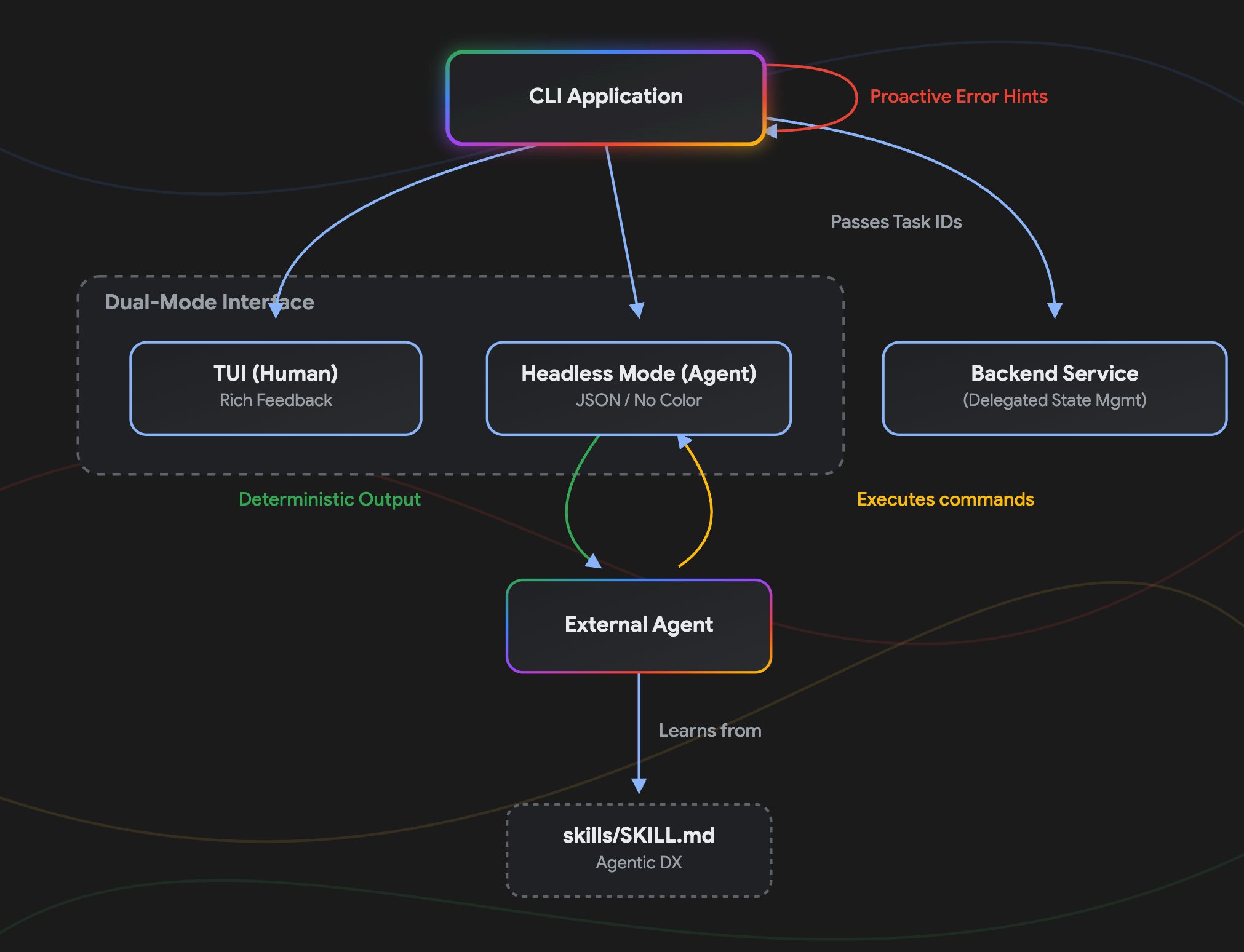
The same `watch` command should give a human a live-updating TUI and give an agent a stream of NDJSON events:
# Human gets the interactive TUI
a2acli watch --task abc123

# Agent gets structured NDJSON
a2acli watch --task abc123 --no-tui
You can achieve this seamless dual-audience experience without maintaining two separate codebases. Instead, adopt these deliberate design patterns that make your CLI predictable for machines while remaining delightful for humans:
1. Structured discoverability
The entry point of a CLI should map out its capabilities clearly. Agents and humans both start at `--help`.
Group commands by function, not alphabetically. Categories like `Task Management`, `Information`, `Configuration` prevent a wall of text in the root help output.
Mark entry points explicitly. Add hints like `(start here)` or `(typical first step)` in help descriptions. Agents use this to decide which command to call first.
Populate three fields for every command:
- Short (Quick scan): One-line summary, 5-10 words, starting with an action verb.
- Long (Deep understanding): What the command does, why it's used, how it differs from similar commands.
- Example (Immediate utility): 3-5 concrete copy-pasteable examples.
Examples matter more than descriptions. A developer will copy-paste before reading. An agent will parse the example to infer the flag pattern.
Task Management:
  send        Send a message to start or continue a task (start here)
  watch       Subscribe to live updates for a running task
  get         Retrieve the current state of a task

Discovery:
  describe    Inspect an agent's identity, skills, and capabilities
Externalized agent directives
Discoverability goes beyond `--help`. Don't assume an LLM natively knows how to use your tool - teach it explicitly.
Ship your repository with an `AGENTS.md` file at the root defining the rules of engagement, default workflows, and architectural standards for AI developers. For complex commands, include a `skills/` directory containing dedicated prompt files that external agents can ingest directly.
2. Agent-first interoperability
To be usable by agents, a CLI must be parseable and predictable.
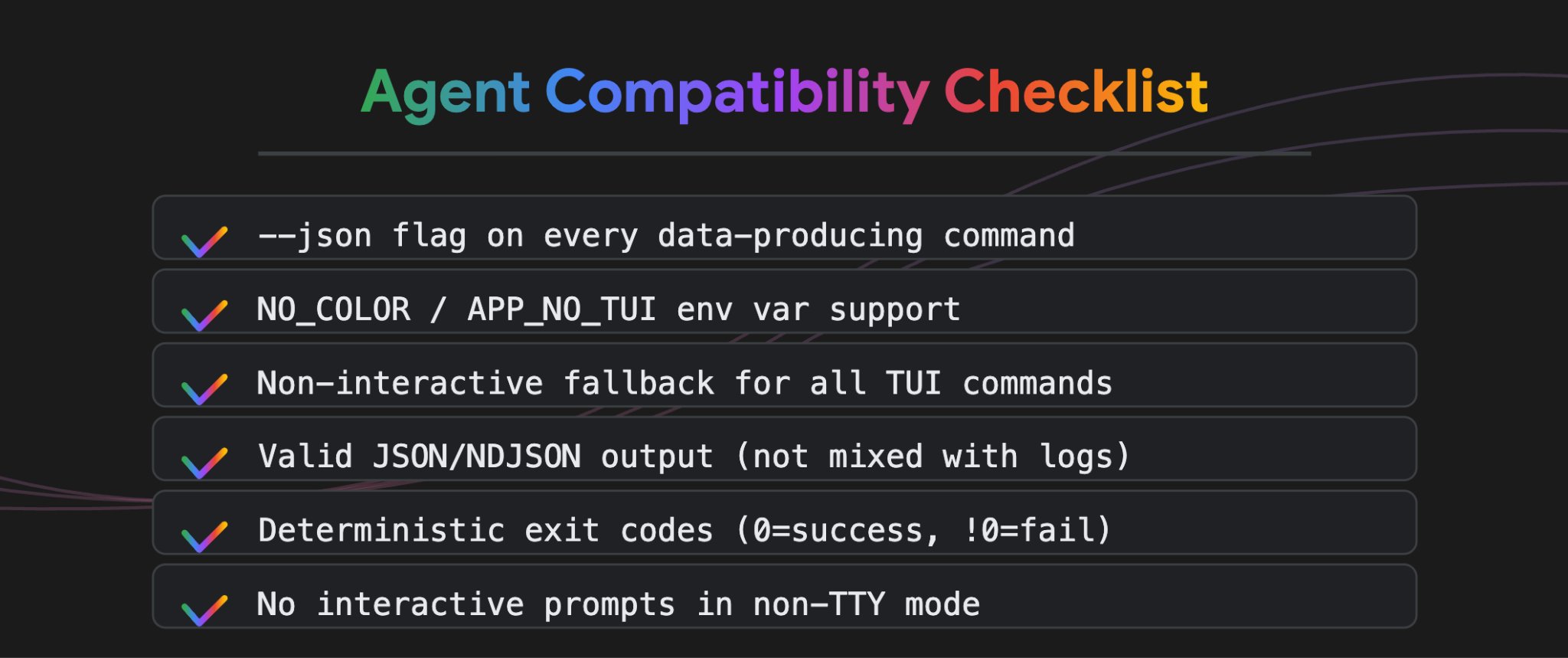
`--json` on everything
Every command that produces data should support a `--json` or `--no-tui` flag. The output should be valid JSON or NDJSON.
If an agent can't parse your output, your CLI doesn't exist in the agentic world.
Detect your audience automatically
Support `NO_COLOR` and `[APP]_NO_TUI` environment variables. When these are set, or when stdout is piped, skip interactive elements entirely. No prompts, no spinners, no color codes.
Non-interactive fallbacks
Commands that use TUIs (like Bubble Tea) should have a plain mode that emits standard text or JSON to stdout. The TUI is the human interface. The JSON output is the agent interface. Same command, two renderers.
Protect the context window
Agents have strict token limits. Actively truncate massive text blobs and mask sensitive secrets in your default output so you don't overwhelm the agent's context window or leak API keys into conversation logs. Require explicit opt-in flags like `--full` or `--verbose` if the agent truly needs the raw, unfiltered payloads.
Pre-process and sort data
An agent shouldn't have to write complex data manipulation logic to find what's important. Automatically pre-sort your CLI output so the most critical, actionable items (e.g., severe vulnerabilities, unrestricted keys, pending tasks) always appear at the very top of the response.
Delegated state management
Do not trap agents in interactive state loops within the CLI process. Keep the CLI completely stateless by using reference identifiers (like `--task
3. Configuration and context
A CLI should understand its environment without requiring excessive flags on every call.
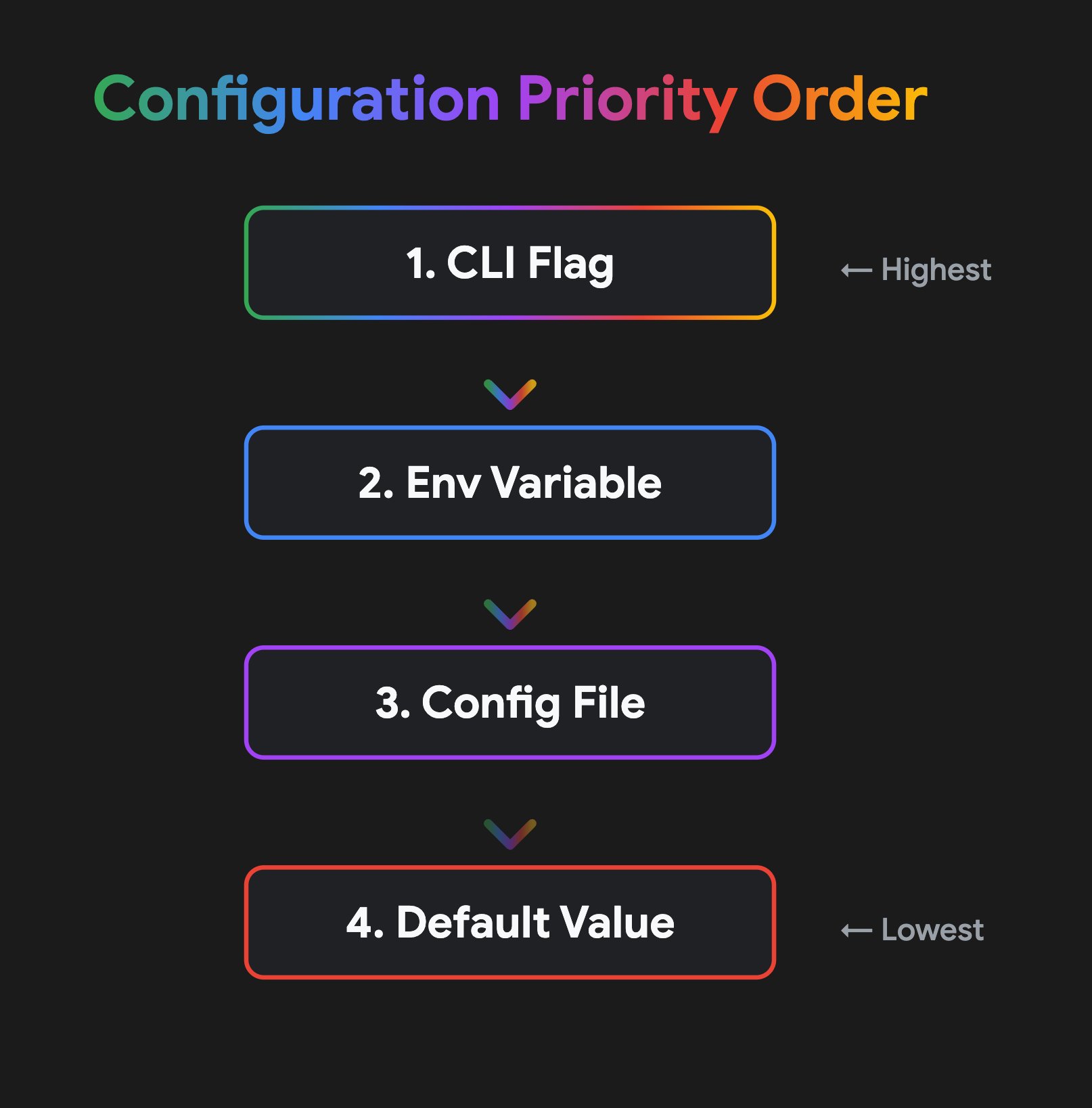
Follow XDG
Config files go in `~/.config/app/config.yaml`. No dotfiles in the home directory. No hidden folders with proprietary formats.
Named environments
Support multiple configs (local, staging, prod) with a simple `--env` flag:
# ~/.config/a2acli/config.yaml
default_env: "local"

envs:
  local:
    service_url: "http://127.0.0.1:9001"
staging:
    service_url: "https://staging-agent.internal.corp"
    token: "my-staging-auth-token"
  prod:
    service_url: "https://agent.example.com"
    token: "my-secure-prod-token"
This matters for agents especially. An orchestrator can set `--env prod` without knowing the URL or token.
# Switch context in one flag
a2acli send "Generate report" --env staging
4. Error guidance
Don't just report errors. Provide a path to resolution.
Contextual hints
When a command fails due to a missing prerequisite, include a `Hint:` line:
Error: database not initialized
Hint: run 'a2acli init' to create the local database
Agents parse these hints to self-correct. Humans appreciate not having to search the docs.
Fail fast
Validate configuration and connectivity before executing heavy logic. Don't let an agent wait 30 seconds for an API call only to discover the auth token is missing.
Deterministic exit codes
- 0: Success
- 1: General error
- 2: Invalid usage / bad flags
- 3: Connection / auth failure
If your CLI returns 0 on a failed operation because "the command itself ran," you'll break every automation that calls it.
5. Flag and argument consistency
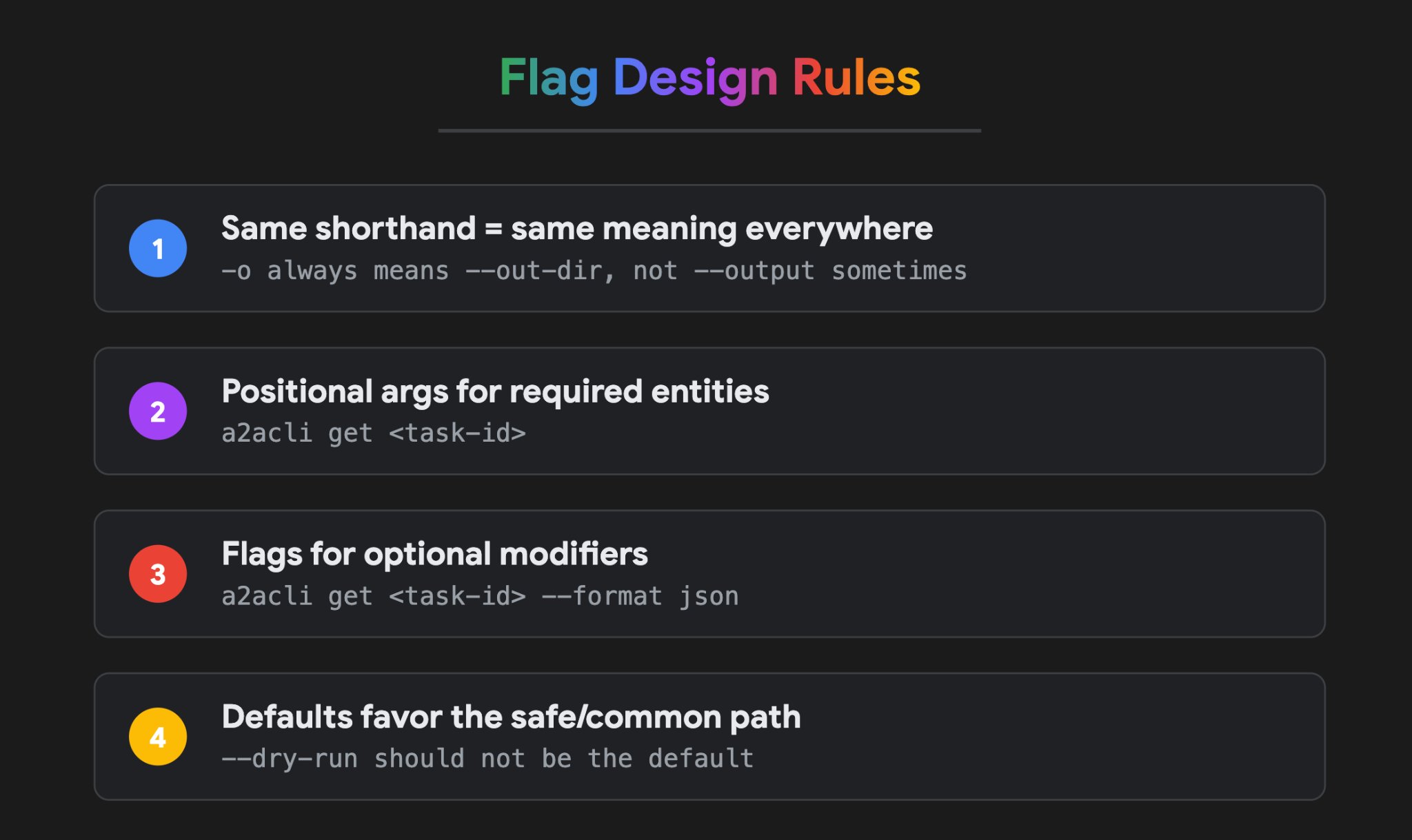
A CLI's syntax should be inherently predictable. If a user (or an agent) learns how to use one command, that intuition should seamlessly carry over to the rest of the application.
- Standardize shorthands: If -o means --out-dir in one command, it must never mean --output in another. Inconsistency breaks agentic reasoning and frustrates human developers.
- Positional vs. Optional: Use positional arguments for core, required entities (e.g., a2acli get
), and use --flags strictly for optional modifiers. - Safe defaults: The default behavior should always be the safest, most common path. Destructive actions should mandate an explicit flag.
6. Visual design for terminals
Color should serve a functional purpose, not an aesthetic one.
Semantic color tokens
Use meaning-based tokens, not raw color names. This keeps the palette consistent and makes it easy to support light and dark terminals.
- Accent (Landmarks): Headers, group titles, section labels
- Command (Scan targets): Command names, flags
- Pass (Success): Completed tasks, success states
- Warn (Transient): Active tasks, warnings, pending states
- Fail (Error): Failed tasks, errors, rejected states
- Muted (De-emphasis): Metadata, types, defaults, previews
- ID (Identifiers): Unique IDs (task IDs, skill IDs)
Rule of thumb
- Reserve color for state. Green for success, yellow for warnings, red for errors. Muted grey for metadata.
- Don't color descriptions or help text. Over-coloring leads to rainbow output where nothing stands out.
- Whitespace over color for hierarchy. Positioning and alignment convey structure better than colors.
- Support both light and dark terminals. Use adaptive colors that maintain contrast regardless of the user's theme.
7. Versioning and Lifecycle
A CLI tool is not a static artifact. It runs in dynamic sequences where versions drift, operations are abruptly interrupted, and security workflows require an audit trail. Handling these lifecycle events intelligently prevents silent failures in automated systems.
- The CLI should know its own version (`--version`) and optionally notify the user of significant updates since the last run.
- Handle `SIGINT` (Ctrl+C) gracefully. No data corruption when someone, or an agent, kills a running operation.
- Track the "Actor" on write operations (derived from `git config user.name` or `$USER`) for auditability.
CLI cheatsheet for humans
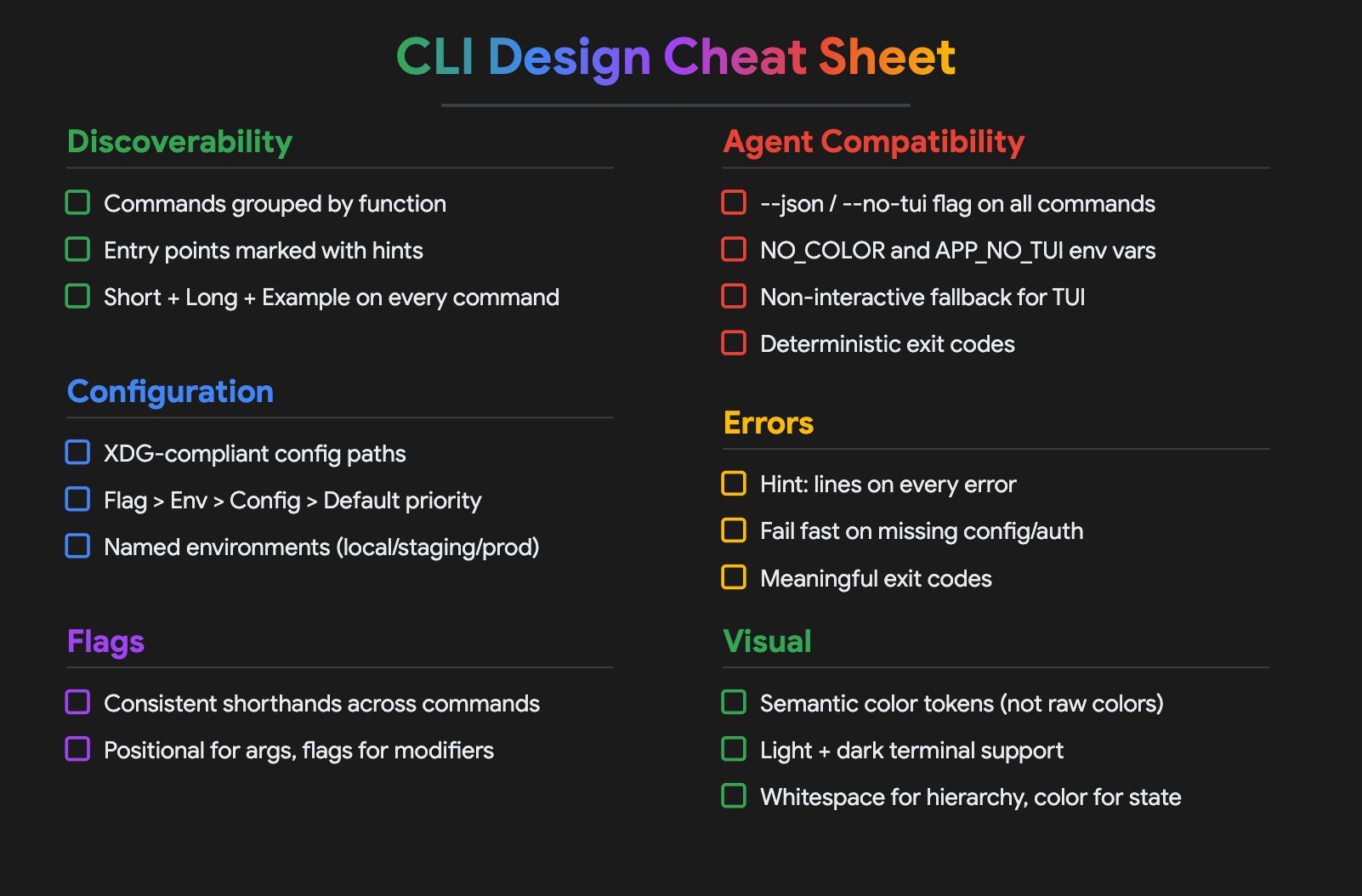
CLI cheatsheet for agents
While humans can use the visual cheat sheet above, an agent needs its own structured set of rules. We can define these interactions using the Agent Skills format.
Check out the CLI Agent Skill for a complete example of how to explicitly teach a coding agent to navigate dual-audience CLIs proactively and deterministically.
End-to-end working demo: The YouTube CLI
Take the YouTube CLI as a prime example. You can now collaboratively manage and review your YouTube channel alongside an agent. By leveraging an agent-aware CLI skill, you and your agent can build the exact toolset required from the YouTube API to retrieve channel stats, toggle video visibility, or upload new content.
Previously, this would have required hunting for a specific MCP server or manually parsing through dense YouTube API documentation.
Here’s the full video demo of how it works:
But for an AI agent to reliably execute a workflow like this, the underlying CLI must be designed for it. If `yt-cli` had blocked the agent with an interactive "Are you sure you want to upload? (Y/n)" prompt, or returned unparseable colored terminal text, the entire automation would have failed.
References
- Inspired by https://github.com/steveyegge/beads/blob/main/docs/UI_PHILOSOPHY.md
- Shout out to this amazing community: https://clig.dev/
The best CLIs in 2026 aren't the ones with the prettiest terminal interfaces. They're the ones that work equally well when a human types the command and when an agent calls it programmatically.